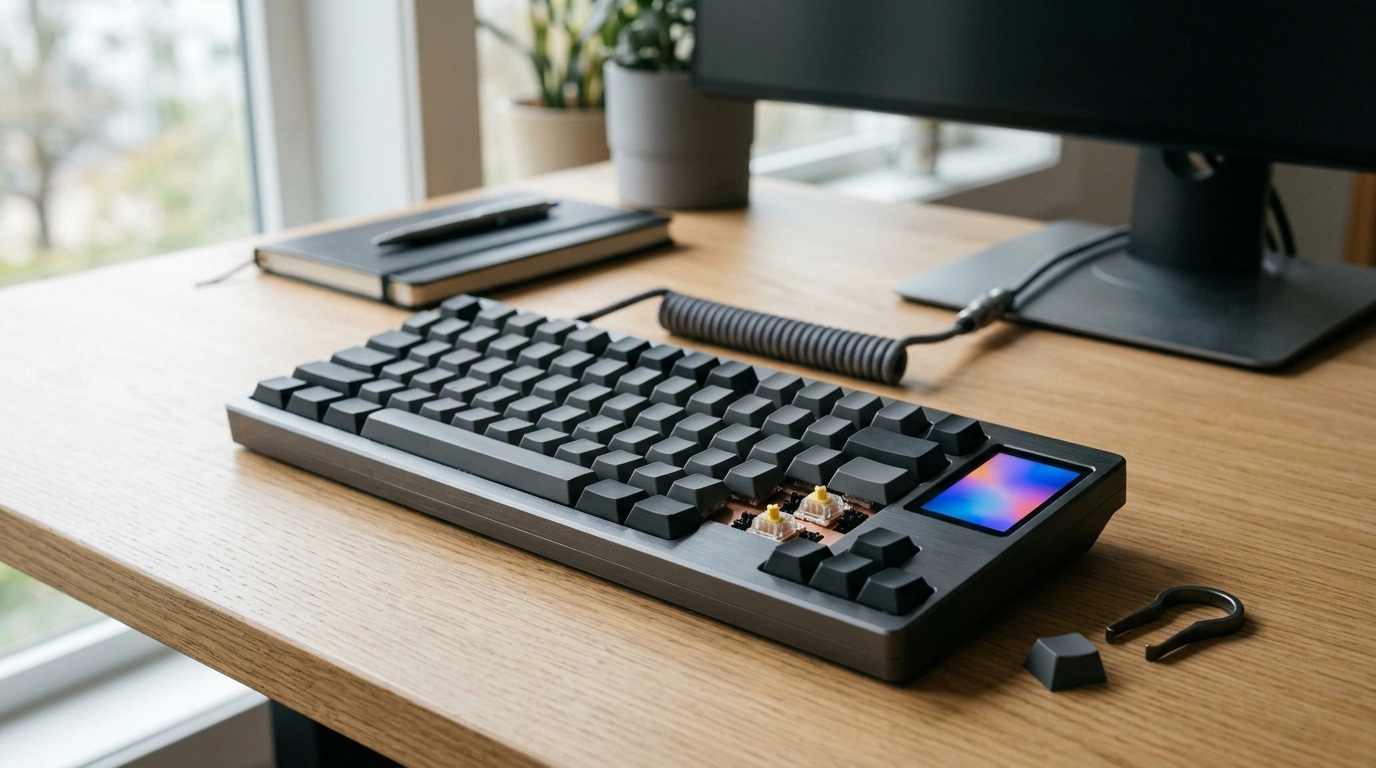
A keyboard can be the quiet center of a setup—or the piece that makes everything feel finished. Our wireless CNC aluminum mechanical keyboard is built for daily work and late‑night sessions with a solid metal chassis, a small LCD for at‑a‑glance info, and hot‑swap switch support so feel and sound can evolve over time without committing to a single build.
If you want one board that can serve as a dependable work tool and still leave room for hobby-level tweaking, this is the kind of “set it down and exhale” upgrade you notice every day.
Some upgrades are about speed. This one is about consistency—how your desk feels hour after hour.
| If you want… | What matters most | Why this keyboard fits |
|---|---|---|
| A cleaner desk | Fewer cables, flexible placement | Wireless design reduces visual clutter and makes repositioning effortless. |
| A sturdier typing platform | No sliding, no hollow feel | CNC aluminum construction adds weight and rigidity. |
| A keyboard that can change with you | Easy customization over time | Hot‑swap switches allow quick experiments with different switch types. |
| Useful personalization without overdoing it | Small, practical info display | LCD provides a compact space for status and controls. |
Aluminum isn’t just a “nice material” checkbox—it changes how the keyboard behaves on your desk.
For comfort over longer sessions, we also recommend paying attention to posture and reach—NIOSH’s ergonomics guidance is a helpful baseline for keeping repetitive work sustainable over time. https://www.cdc.gov/niosh/topics/ergonomics/
The LCD and hot‑swap support are best when they reduce friction, not add complexity.
| Goal | Try this approach | What to listen/feel for |
|---|---|---|
| Quieter typing | Swap common keys first (spacebar, enter, backspace) | Less sharp top-out sound, reduced noise on rapid repeats |
| More accuracy | Use tactile switches on frequently typed keys | Clear actuation feedback without needing to bottom out |
| Smoother gaming movement | Use linear switches for movement/ability keys | Consistent travel, faster repeated presses |
| Balanced all-day comfort | Mix switch types by zone (work vs. play) | Reduced fatigue while keeping preferred response where it matters |
Wireless shines when your keyboard needs to move: shifting between work areas, clearing space for a notebook, or resetting your desk for a different task.
If you like to nerd out on the underlying standards, the Bluetooth SIG maintains the Bluetooth Core Specification. https://www.bluetooth.com/specifications/bluetooth-core-specification/ USB HID is also a useful reference for how keyboards generally communicate with computers. https://www.usb.org/hid
Compare related options such as Calming Plush Dog Bed for Medium to Large Dogs to match features, dimensions, and use case before choosing.
Hot‑swap means you can remove and replace compatible mechanical switches without soldering. It matters because you can change the feel and sound over time, test different switch types easily, or replace a single worn or inconsistent switch instead of servicing the whole keyboard.
Yes—most people notice the added weight and rigidity right away, which can make the board feel more stable and premium during daily use. Aluminum is also easy to wipe down, helping your desk stay looking clean with minimal effort.
Keep it practical: simple status indicators, small widgets, or quick-read info that helps you stay on task. The best everyday setup treats the LCD as a glanceable utility, not a distraction competing with your main screen.
A keyboard can be the quiet center of a setup—or the piece that makes everything feel finished. Our wireless CNC aluminum mechanical keyboard is built for daily work and late‑night sessions with a solid metal chassis, a small LCD for at‑a‑glance info, and hot‑swap switch support so feel and sound can evolve over time without committing to a single build.
If you want one board that can serve as a dependable work tool and still leave room for hobby-level tweaking, this is the kind of “set it down and exhale” upgrade you notice every day.
Some upgrades are about speed. This one is about consistency—how your desk feels hour after hour.
| If you want… | What matters most | Why this keyboard fits |
|---|---|---|
| A cleaner desk | Fewer cables, flexible placement | Wireless design reduces visual clutter and makes repositioning effortless. |
| A sturdier typing platform | No sliding, no hollow feel | CNC aluminum construction adds weight and rigidity. |
| A keyboard that can change with you | Easy customization over time | Hot‑swap switches allow quick experiments with different switch types. |
| Useful personalization without overdoing it | Small, practical info display | LCD provides a compact space for status and controls. |
Aluminum isn’t just a “nice material” checkbox—it changes how the keyboard behaves on your desk.
For comfort over longer sessions, we also recommend paying attention to posture and reach—NIOSH’s ergonomics guidance is a helpful baseline for keeping repetitive work sustainable over time. https://www.cdc.gov/niosh/topics/ergonomics/
The LCD and hot‑swap support are best when they reduce friction, not add complexity.
| Goal | Try this approach | What to listen/feel for |
|---|---|---|
| Quieter typing | Swap common keys first (spacebar, enter, backspace) | Less sharp top-out sound, reduced noise on rapid repeats |
| More accuracy | Use tactile switches on frequently typed keys | Clear actuation feedback without needing to bottom out |
| Smoother gaming movement | Use linear switches for movement/ability keys | Consistent travel, faster repeated presses |
| Balanced all-day comfort | Mix switch types by zone (work vs. play) | Reduced fatigue while keeping preferred response where it matters |
Wireless shines when your keyboard needs to move: shifting between work areas, clearing space for a notebook, or resetting your desk for a different task.
If you like to nerd out on the underlying standards, the Bluetooth SIG maintains the Bluetooth Core Specification. https://www.bluetooth.com/specifications/bluetooth-core-specification/ USB HID is also a useful reference for how keyboards generally communicate with computers. https://www.usb.org/hid
Compare related options such as Calming Plush Dog Bed for Medium to Large Dogs to match features, dimensions, and use case before choosing.
Hot‑swap means you can remove and replace compatible mechanical switches without soldering. It matters because you can change the feel and sound over time, test different switch types easily, or replace a single worn or inconsistent switch instead of servicing the whole keyboard.
Yes—most people notice the added weight and rigidity right away, which can make the board feel more stable and premium during daily use. Aluminum is also easy to wipe down, helping your desk stay looking clean with minimal effort.
Keep it practical: simple status indicators, small widgets, or quick-read info that helps you stay on task. The best everyday setup treats the LCD as a glanceable utility, not a distraction competing with your main screen.



Leave a comment